Easy Extract Icon

Easily extract icons from executable files (*.exe, *.dll) and any files. The most fabulous feature: extract icons from any file, even .doc files!

21-Day Free Trial Windows Compatible Only $12
Extract icons from EXE, DLL, and any file type
Extract all icons from files with multiple icons
Save icons to current folder or custom directory
Settings automatically stored in registry

Powerful Icon Extraction

Everything you need to extract and save icons

Universal Extraction

Extract icons from any file! Even from .doc files or any file that has an associated icon. No need to find the original executable.

Multiple Icons

If a file contains multiple icons, Easy Extract Icon can extract all of them. Perfect for DLL files that store many icons.

Flexible Output

Save extracted icons to the same directory as the source file, or specify a custom folder for all extracted icons.

Auto-Settings

Program configuration is automatically stored in Windows registry. No need to configure after each use.

Fast & Simple

Just two steps: choose a file and press Extract. Get your icons instantly with minimal effort.

Windows Integration

Works seamlessly on Windows XP, Vista, 7, 8, 10, and 11. Extract icons from any Windows executable.

Simple Pricing

One-time purchase, yours forever

Single License

$12/license

One-time purchase, yours forever

  • Single computer license
  • All features included
  • Free email support
  • Lifetime use
  • Minor updates included
Buy Now

Most Fabulous Feature

Easy Extract Icon can extract icons from any file! If you want to extract an icon from your contacts.doc, you don't need to find the MS Word executable file - just point to contacts.doc and extract. It will extract the icon of MS Word!

How to Use

Get started in just two simple steps

Choose a File

Use the File | Open command to select the file from which you want to extract icons. This can be an executable file (*.exe), a dynamic link library (*.dll), or any other file that has an associated icon.

Press Extract

Press the Extract button (or use the File | Extract command). The program will extract icons from the selected file.

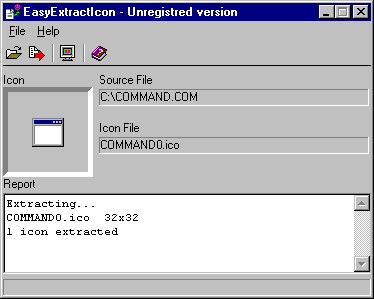
During extraction, the program displays:

  • The currently extracting icon
  • The name of each icon
  • A summary report of extracted icons

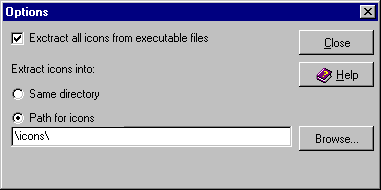
Options Dialog

Easy Extract Icon Options Dialog

Extract All Icons from Executable Files

If checked, the program will extract all icons stored in an executable file. Otherwise, it will extract only the first (default) icon. While *.exe files typically contain one icon, *.dll files often serve as storage for multiple icons. Checking this option allows you to extract all icons from DLLs.

Extract Icons Into

You may extract icons into the same directory where the source file is located, or specify a separate directory for icons (for example, c:\graphics\icons\).

Name Convention

If you extract icons from a file named name.ext, the extracted icons will be named:

  1. name0.ext
  2. name1.ext
  3. And so on...

If you extract icons from a non-executable file (which typically has just one icon), the program will create name0.ext.

How to Register

The trial period for Easy Extract Icon is 21 days. After that, you should register the software for $12 US.

We use PayPro Global as our registration service. It is a fast, secure, and reliable method for shareware registration. Registration can be performed by any method (bank transfer, check, phone call, etc.) over a secure web server.

Buy Now - Only $12

Start Extracting Icons Today

Get Easy Extract Icon and extract icons from any file

Download Easy Extract Icon

Version: | Size: MB | Windows XP/Vista/7/8/10/11


Ready to Extract Icons?

Download Easy Extract Icon and extract icons from any file in seconds

Download Free Trial